Here is the step by step guide on how to convert simple web pages into high quality PDF files. For this purpose you will use PDF bookmarklet which will let you save your pages so easily into nice readable and presentable form. This method works for both firefox as well as Google Chrome browsers , and it will work for many other browsers as well.
So here wo go then.
FOR FIREFOX:
- First of all Drag this link “Convert to PDF Format” to the bookmarks bar of your firefox browser as shown in the picture.
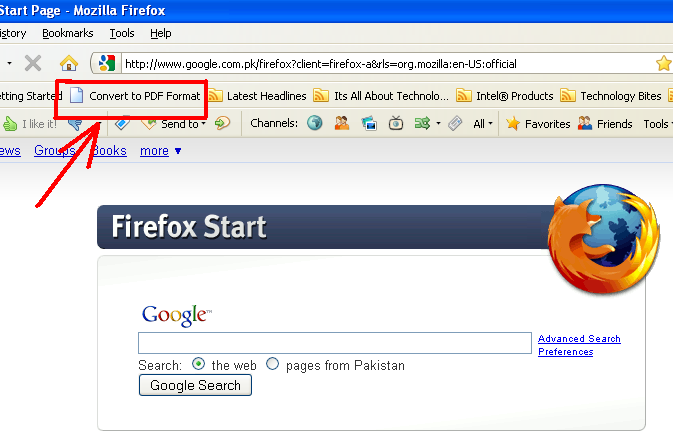
- Now simply open the webpage which you want to save as pdf format and simply click this previously saved bookmartlet.
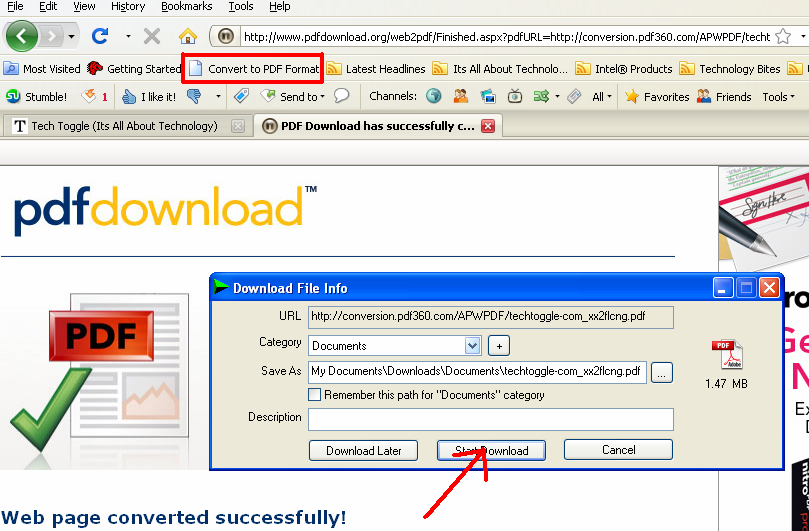
- Thats it. Just save this PDF file to your desired location and read the pages as you like.
For Google Chrome:
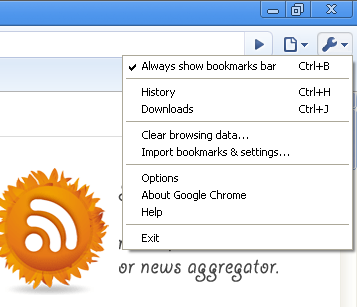
- First of all enable “always show bookmarks bar” by Ctrl+B or manually as shown in picture.
 Then Drag this link “Convert to PDF Format” to the bookmarks bar.
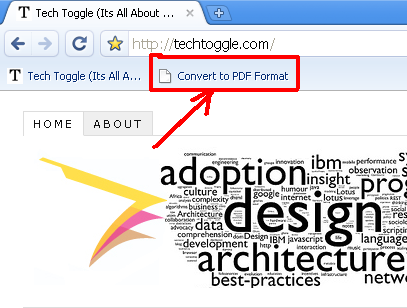
- Every thing afterwards is same as described for firefox. Just save your favourite webpages to PDF and enjoy reading them in more organized format.
[Via : PDFDownload.ORG ]
StumbleUpon | Digg | Reddit | Tweet | Facebook | Technorati | Delicious | Ping.fm | Slashdot


{ 1 comment… read it below or add one }
Thanks, Haseeb!
I’ve been wondering how to do this.